Menu
September 21st, 2026
In This Article
- How To Spot Phishing Attacks - Develop habits to stay out of trouble.
- Learn About Attack Methods - Spot specific techniques scammers use to fool victims.
- Scenarios Targeting Law Firms - From wire fraud to fake clients, law firms are a ripe target for scammers.
- How To Report Phishing - Alert email providers to scams in a few easy clicks.
Phishing emails are harder to spot than ever and lawyers, with their access to so much sensitive information, are a uniquely rich target for scammers. Today, with AI, scammers can quickly create convincing emails using real logos, polished writing, and personalized information gathered from public sources.
So instead of relying on bad grammar or sloppy design to spot a scam, here are some quick ways to recognize a potential phishing attack, followed by steps you can take to report one to your email provider.
Develop Your Scamdar
Today's phishing emails are extremely convincing. That means the best defense isn't simply spotting a fake-looking email. It's developing the habit of stopping and questioning an email before taking a sensitive action.
Before clicking a link, opening an unexpected attachment, entering login information, sharing sensitive information, or sending a payment, ask yourself:
Are You S.U.R.E.?
- S - Sender: Is the sender really who they claim to be?
- U - Unexpected: Was I expecting this email?
- R - Rush: Is it pressuring me to act quickly or emotionally?
- E - Elsewhere: Can I verify it somewhere other than through this email?
If any single answer feels "off," don't act. Verify first, even if it means a short delay or asking "hey, did you actually send this?"
Methods of Attack
Here are the four most common techniques scammers use to phish for your information and money. Most scammers will combine these methods into a single email.
1. Lookalike Email Addresses
As email address authenticity standards have become more the norm, scammers are increasingly using free email account services like Gmail and Outlook to create brand adjacent lookalike addresses that sound legit but are, in fact, totally fake. For instance:
Instead of [email protected] they may use [email protected]. Or instead of [email protected], they may create [email protected].
When you're moving quickly through your inbox, it's easy to miss a lookalike. Further, many email programs default to hiding the email address of the sender, instead showing only the display name. You may have to click or hover on the sender to see if it's the email address you're expecting.
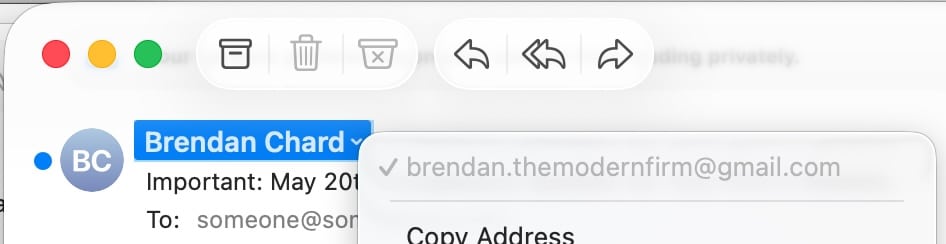
Example in Mac Mail

Example in Gmail
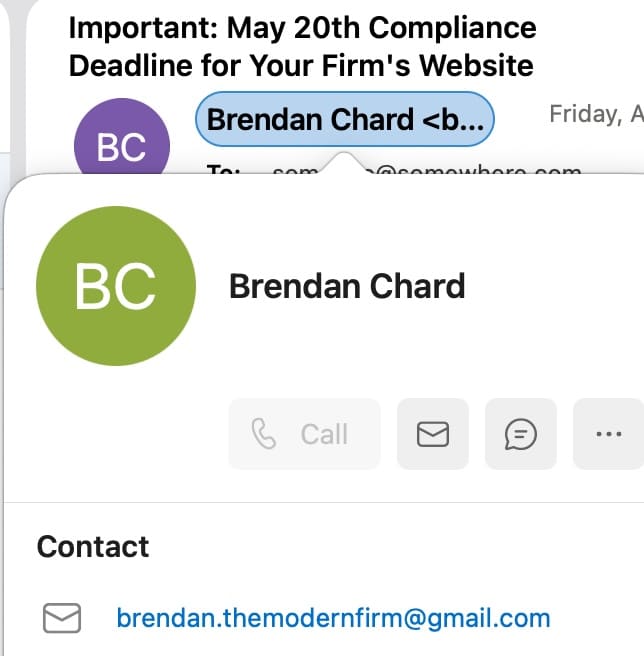
Example in Outlook
2. Spoofed Email Addresses
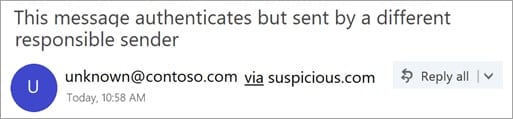
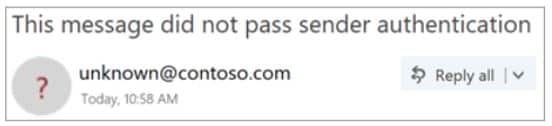
Spoofing is when a scammer tries to impersonate a legitimate email address by sending from that address. Fortunately over the last few years, email service providers have adopted various standards to prove the authenticity of email so that only the email address owner, or authorized services, can send messages from their address. This includes SPF, DKIM and DMARC. As a result, this spoofing type of activity is falling out of favor when compared to lookalike email accounts.
If you receive a spoofed email from a scammer, it's likely to show up in your inbox with some sort of warning or anomaly.
3. Compromised 3rd Party Software
eSignature and file sharing software like Docusign, Box.com, Dropbox and Google Drive are highly trusted email senders that don't get blocked by spam filters, this makes them a favorite tool of scammers. With a compromised account, they can use the platform to send out phishing attacks directly from the compromised account.
Remember, do not click links and attachments unless you are S.U.R.E.
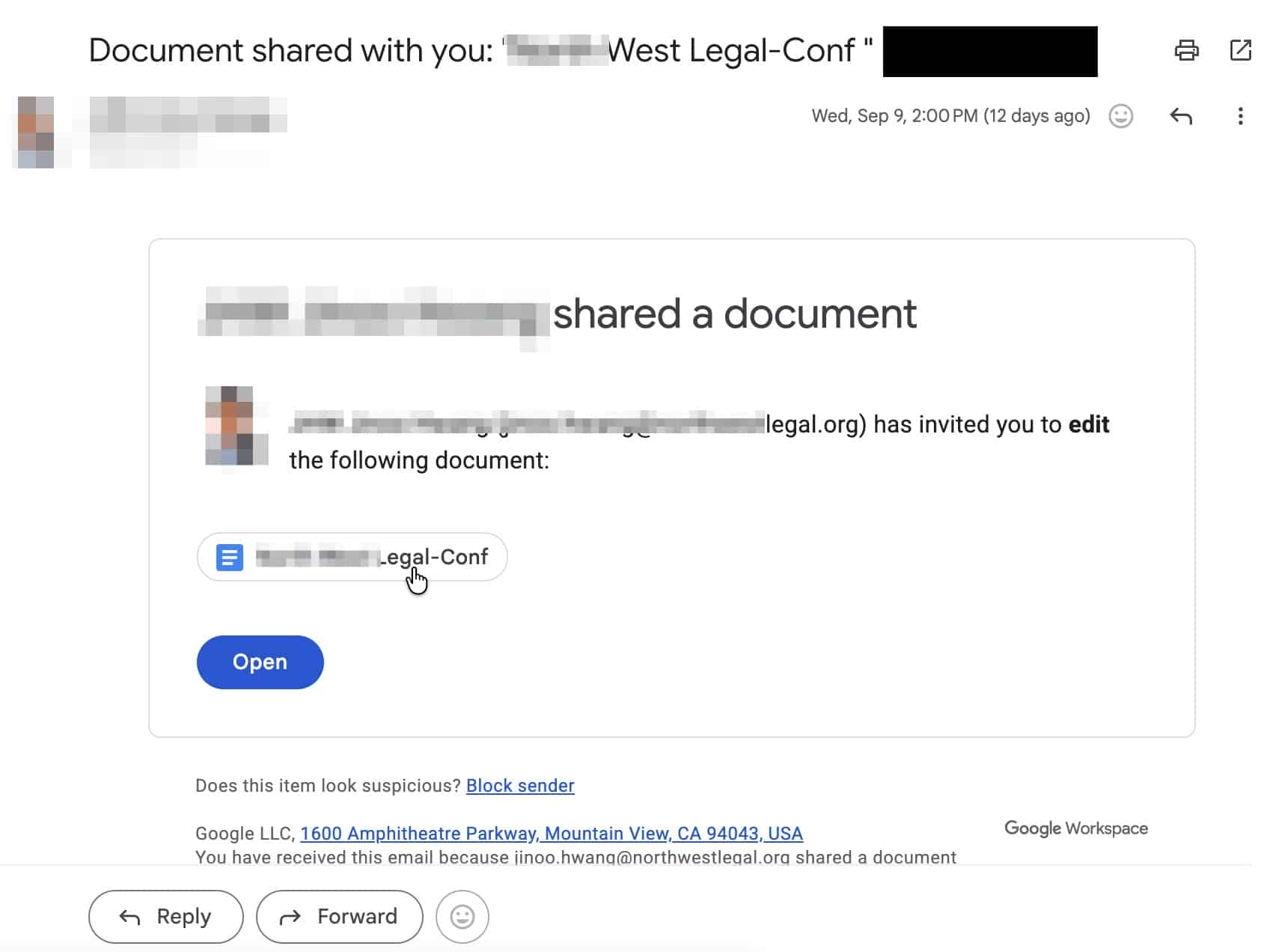
Sample attack email from a compromised Google Drive account.
Tip: The best way to protect your own accounts from being abused in this kind of attack is to use strong unique passwords and to enable 2-factor or Passkey authentication.
4. Tricky Links
Most phishing attacks are designed to make you take action by clicking a link to a webpage that prompts you for payment, login credentials or other sensitive information. Always verify the link you are visiting. When in doubt, visit the website manually to find the resource you are looking for.
For example, if you receive an email alerting you to update your payment information on Amazon.com and are feeling unsure about it, you can visit Amazon yourself, instead of clicking the link, to ensure that you are on the legitimate website.
In an email, and on webpages, links have two main parts. The link, and the text that describes the link. Many times they are the same. But scammers will use the descriptive text to obfuscate the real destination.
You can hover over a link to see where it actually leads. Once clicked, you should also check the web browser address bar to ensure you are where you think you should be.
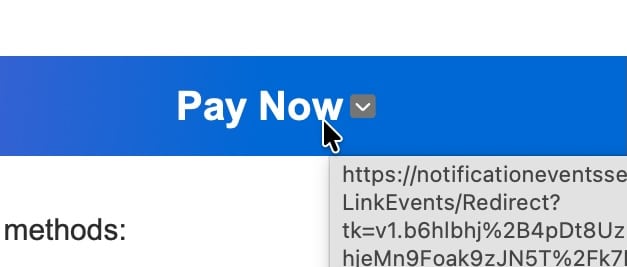
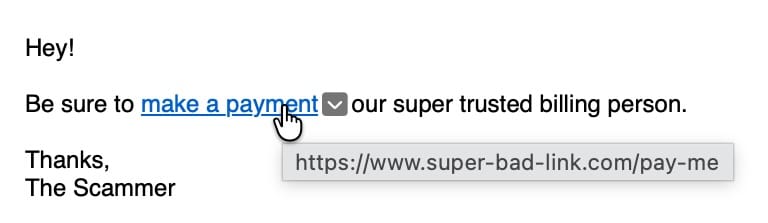
Note: Antivirus software, malware detection software, corporate email scanners, and email newsletter programs like Constant Contact and Mail Chimp, may change links in email to add tracking or protection capabilities. This is a normal behavior which is why it is important to check the address bar in your web browser once you are at the destination.
Scenarios Targeting Law Firms
Law firms, even small ones, have a very public profile. Their contact information is listed on their website, business directories, bar directories, promotional directories, advertising platforms, award websites, court filings, news articles and more. This availability of public information makes attorneys a common target for scammers.
Fake Client Scams
These scams usually involve outreach done over email or your website contact form. A "new client" has a relatively straightforward matter and quickly paid the retainer, except they accidentally send too much. While you're waiting for their fraudulent check to clear, they ask you to refund you the difference. If you act too quickly, you'll have sent them a legit check before their fake check bounces.
- Never refund a payment that hasn't fully cleared.
- Utilize merchant services or ACH clearing to process payments more quickly.
- Protect your own checking account from fraud by enrolling in your bank's positive pay system.
Bar Association or Regulator Impersonation
Scammers will use lookalike email accounts to impersonate your state bar or attorney discipline board. They'll send you a complaint or compliance warning with language encouraging you to open the attachment to view the complaint. But, the attachment is actually a virus or macro enabled document that steals information and compromises your system.
- Call your bar association to confirm.
- Go directly to your regulator's website rather than clicking the attachment or link.
- Keep your antivirus and malware software up-to-date.
Subpoena or Legal Notice Phishing
Scammers know that law firms are used to receiving legal documents out of the blue through systems like DocuSign, Adobe Sign, Google Drive, Share File and other similar systems. Scammers will send fake "service" emails with malicious attachments posing as the document. These emails appear legit, because they're sent through a familiar system, but attachments then infect your system or send sensitive information to the attacker.
- Treat unexpected "service" attachments like any other unexpected attachment. Verify the sender first.
- Confirm through the court or opposing counsel's known contact info if anything feels uncertain.
- Keep your antivirus and malware software up-to-date.
Fake E-Filing System Alerts
A scammer will spoof e-filing notifications using lookalike accounts and claim a document or deadline needs your attention. The email looks legit but it sends you to a fake login page that also looks legit just like the court system. However, when you attempt to log in, the fake site steals your credentials.
- Use caution when logging in through an emailed link, instead, go to the e-filing system directly.
- Check the sender's actual domain, not just the display name.
- Add the email address from notification systems to your contact list and give it a unique name. This name will then appear in your inbox when the legitimate email address is used.
Vendor and Invoice Fraud
Scammers will send fake invoices and communications appearing to come from familiar vendors including process servers, marketing companies, banks, payment processors, court reporters, research platforms and legal software vendors. The invoices contains slightly altered payment details that direct the funds to the scammer's account.
- Confirm any changed payment details by phone, using a number already on file.
- Watch for invoices that look slightly off, even when the amount seems normal.
- Use secure automatic payment with vendors when possible to establish a known routine.
- Quickly dispute any fraudulent charges with your credit card company.
Wire Fraud Targeting Closings, Trust, and Escrow
Scammers will monitor real estate closings or settlement transactions, then send "updated" wiring instructions that redirect client funds to an account they control. This is often timed to arrive right when a wire is expected.
- Never trust wiring instructions received only by email. Confirm by phone using a number already on file, not one from the email itself.
- Have an established process for receiving wire transfer information.
- Treat any last-minute change to wiring instructions as a red flag, especially close to closing.
Executive or Partner Impersonation
This is an oldie but still gets traction. A scammer poses as a partner or firm executive, often after hours, requesting a funds transfer, gift card purchase, or sensitive data.
- Be wary of urgent requests that discourage a quick phone confirmation.
- Verify with the partner through a separate channel, even if the name on the email looks right.
Staff Impersonation for Payroll Changes
A new twist on partner impersonation is a scammers posing as a law firm employees requesting a change to direct deposit account. This allows the scammer to steal the employee's paycheck.
- Directly contact and independently confirm any payroll changes with your employees.
- Have an established process for employees to request banking changes.
Malicious Attachments from Opposing Counsel
Emails impersonating opposing counsel that include an attachment containing malware, aimed at network access rather than money.
- Confirm unexpected attachments by phone, especially macro-enabled files or password-protected zips.
- Keep antivirus and email filters current.
Reporting a Phishing Attack to your Email Provider
Reporting phishing attacks to your email provider is a critical step in fighting back against scammers. Unlike spam, which is oriented towards unsolicited promotion of products, services and ideas, phishing is a deceptive attack designed to steal passwords, money and sensitive personal information. Email providers respond to spam and phishing emails differently. Since phishing is a much higher security risk, email providers tend to respond more aggressively to phishing reports which is why it is helpful for users to report phishing attempts from their inbox.
Report Phishing Emails in New Outlook
-
Open the suspicious message in new Outlook (if your Reading Pane is visible, select the suspicious message).
-
On the Home tab, select
 Report > Report phishing.
 Report >
 Report Phishing Emails in Classic Outlook
-
Open the suspicious message in classic Outlook (if the Reading Pane is visible, select the suspicious message).
-
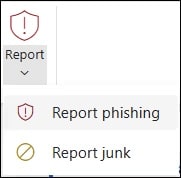
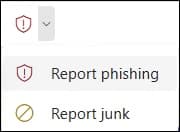
On the Message tab of the open message, select Report > Report Phishing:
Classic Ribbon
Simplified Ribbon
Report Phishing Emails in Gmail
-
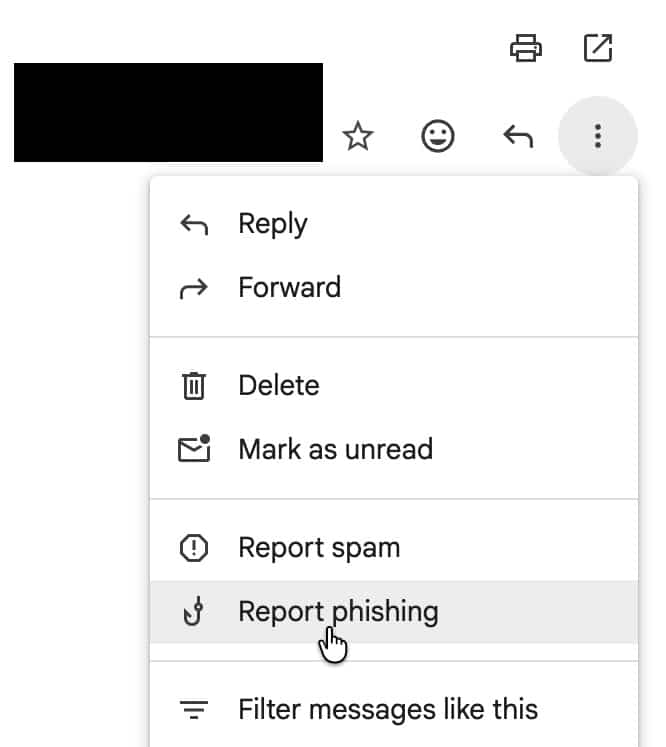
Click the vertical ellipsis menu ⋮ in the upper-right corner of the message you wish to report.
-
Click "Report Phishing"
Final Thoughts
Phishing, unfortunately, isn't going away. If anything, AI is only going to make these scams both harder to spot and more prevalent. But the good news is that spotting them was never really the point; questioning them is. The S.U.R.E. method above works because it doesn't ask you to become a security expert overnight, it just asks you to slow down and double-check, especially when money, credentials, or client information are on the line.
We'd also encourage you to share this post with your staff, and to make "let's just check" a normal, unremarkable part of how your office handles anything involving payments, wires, logins, or sensitive information. In our observation, the firms that get caught by these scams aren't usually missing technical safeguards, they're just moving a little to quick for their own good.